
How to Ease Wrist Syndrome and Mouse Hand Symptoms: Practical Relief Tips
If you spend a lot of time on a keyboard, mouse, steering wheel, or tools, wrist pain, tingling, and hand weakness can become hard to ignore. These symptoms are often described as wrist syndrome or carpal tunnel-style discomfort. The good news is that small changes in positioning, rest, and support can often make daily activities more manageable.
This guide explains the most common symptoms, what tends to make them worse, and what to try first when your wrist feels irritated.
What wrist syndrome and mouse hand symptoms usually feel like
People often notice symptoms in the wrist, palm, thumb, index finger, or middle finger. They may start mildly and become more noticeable with repeated use, especially during work or at night.
- Numbness or tingling in the hand or fingers
- Aching, stiffness, or burning around the wrist
- Weak grip strength or trouble holding small objects
- Pain that gets worse after typing, mousing, driving, or repetitive hand use
- Symptoms that flare up at night or when waking up
If the discomfort spreads into the forearm, shoulder, or neck, it may be a sign that your posture or workstation setup also needs attention.
What often makes it worse
Many everyday habits can add strain to the wrist. The most common ones include:
- Keeping the wrist bent for long periods
- Using a mouse or keyboard that sits too high or too low
- Gripping tools tightly for long stretches
- Driving for long periods without breaks
- Sleeping with the wrist curled or compressed
If your symptoms happen mainly during work, it may help to review your setup and take more frequent short breaks. For broader posture support, you can also read our guide to other support articles in our blog.
Simple relief steps to try first
These are basic, low-risk steps many people use to reduce strain:
1. Rest the wrist when possible
Short breaks can help reduce repeated pressure on irritated tissues. Even a few minutes away from typing or mousing may help.
2. Keep the wrist in a more neutral position
A neutral wrist position is usually more comfortable than bending the wrist up or down for long periods.
3. Use cold compresses for short periods
A cold pack wrapped in a cloth for 15 to 20 minutes at a time may help with temporary swelling or soreness.
4. Reduce strain during sleep
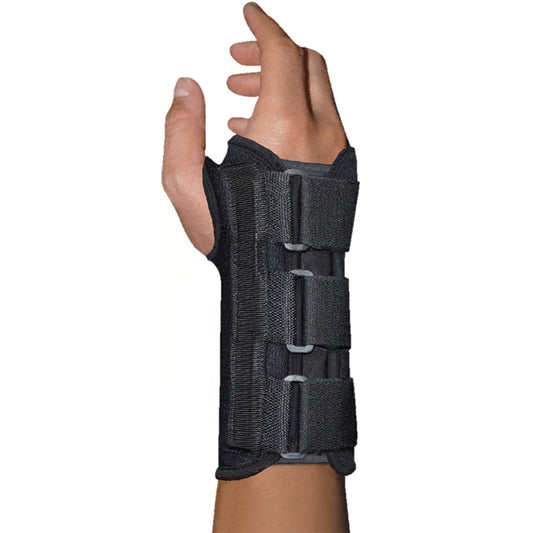
Many people notice night-time discomfort because the wrist bends while sleeping. A supportive brace can help keep the wrist from curling inward.
When a wrist brace may help
A wrist brace can be useful when you need extra support during sleep, work, or repetitive tasks. It is not a cure, but it may help reduce awkward wrist movement and make resting the wrist easier.
If you are looking for a supportive option to wear during rest or light daily activity, see our wrist brace.

Wrist Brace
A simple support option for reducing wrist bending and helping the wrist rest more comfortably.
Why consider it: Helpful when you want steadier support during sleep, desk work, or recovery days.
Better workstation habits can reduce strain
If your symptoms are linked to computer use, your setup matters. Try these adjustments:
- Keep your keyboard and mouse at a comfortable height
- Relax your shoulders instead of reaching forward
- Keep elbows close to your sides when possible
- Use lighter mouse pressure and smaller movements
- Take short breaks to open and close your hands
These changes do not solve every case, but they can reduce repeated stress that builds up over the day.
When to pay closer attention
If numbness, weakness, or pain keeps returning, or if you are having trouble with driving, dressing, gripping, or sleeping, it is a good idea to seek professional advice. Ongoing hand symptoms should not be ignored, especially if they are getting worse over time.
For readers looking for more general support options, our wrist support collection is a helpful place to compare products built for everyday wrist comfort.
Choosing the right wrist support
When selecting a brace or support, think about when you will wear it and what kind of movement you want to limit. A good option should feel supportive without being so restrictive that it becomes uncomfortable to wear.
- For sleep: choose something that helps keep the wrist from folding
- For desk work: look for support that allows light daily use
- For recovery breaks: choose a comfortable fit that is easy to put on and remove
Browse the full wrist support collection to find options that fit your routine.
FAQ
What are the first signs of wrist syndrome?
The earliest signs are often tingling, numbness, mild pain, or weakness in the wrist and fingers, especially after repetitive use or during sleep.
Why do mouse hand symptoms get worse at night?
Nighttime symptoms can happen because the wrist bends while sleeping, which may increase pressure and make tingling or numbness more noticeable.
Can a wrist brace help with mouse hand pain?
A wrist brace may help by reducing wrist bending and giving the joint more support, especially during rest or sleep. It is best used as part of a broader approach that includes breaks and better positioning.
What should I change first if computer work hurts my wrist?
Start with your desk setup, mouse use, and break schedule. Small posture changes and shorter periods of uninterrupted use can make a noticeable difference.
If your symptoms are persistent, worsening, or affecting daily tasks, it is best to speak with a qualified health professional for proper evaluation.