
How to Reduce Back, Neck, and Eye Strain When Using a Computer for Long Hours
Spending hours at a computer is part of daily life for many people, whether for work, study, or gaming. But staying in the same position too long can gradually lead to back pain, neck stiffness, tired eyes, sore wrists, and overall fatigue. The good news is that a few simple changes to your setup and habits can make computer time much more comfortable.
If you often finish the day feeling tight through your shoulders, lower back, or neck, start with the basics: sit in a more neutral position, place your screen at a comfortable height, and take regular movement breaks. These small adjustments are often more helpful than trying to push through discomfort.
Why long computer use can make your body hurt
Computer use itself is not usually the whole problem. The bigger issue is staying still, leaning forward, and repeating the same hand and arm motions for long periods. Over time, that can increase strain in several areas:
- Back: slouching or leaning toward the screen can put extra pressure on the lower and mid back.
- Neck and shoulders: a screen that is too low or too far away often causes forward-head posture and shoulder tension.
- Wrists and elbows: poor keyboard and mouse position can create awkward angles and repetitive stress.
- Eyes: staring at a bright screen without enough blinking or breaks can lead to dryness and fatigue.
Discomfort often builds slowly, so it is easy to ignore until it becomes a daily pattern.
Set up your sitting posture first
Good computer posture does not mean sitting stiffly. It means creating a position your body can maintain without excessive strain.
Try these posture basics:
- Keep your back supported and your shoulders relaxed rather than rounded forward.
- Let your elbows rest close to your sides at about a right angle.
- Keep your wrists as neutral as possible, not bent sharply up or down.
- Place both feet flat on the floor or on a stable footrest.
- Keep your knees in a natural bent position instead of tucked tightly under the chair.
A common mistake is leaning toward the monitor, especially when concentrating. If you notice that habit, bring the screen to you instead of bringing your head to the screen.
Adjust your desk and screen to reduce strain
Your workstation setup matters as much as your posture. Even a good sitting position becomes hard to maintain if the desk, chair, or monitor is poorly placed.
Use these simple guidelines:
- Screen distance: keep the monitor roughly 40 to 50 cm from your eyes, or at a distance that feels easy to read without leaning in.
- Screen height: the top portion of the screen should usually be at or slightly below eye level so your neck can stay relaxed.
- Brightness: avoid a screen that feels harsh or glaring. Adjust brightness and contrast to match the room.
- Chair height: raise or lower your chair so your forearms can stay comfortable when typing.
- Keyboard and mouse placement: keep them close enough that you do not have to reach forward constantly.
If you work from a laptop for long periods, it can be harder to maintain good neck position because the screen and keyboard are attached. In that case, be especially mindful of how much you are looking down.
Take breaks before your body forces you to
One of the most effective ways to reduce computer-related discomfort is simply to move more often. Many people wait until they already feel sore, but short breaks work better when taken regularly.
A practical routine is to pause every 30 to 60 minutes. During that break, try one or two of the following:
- Stand up and walk for a minute or two
- Roll your shoulders backward
- Gently stretch your chest, upper back, and neck
- Look into the distance to give your eyes a rest
- Open and close your hands to relax your fingers and wrists
These breaks do not need to be long. The goal is to interrupt long periods of stillness.
How to reduce eye fatigue during screen time
Eye strain is one of the most common complaints during long computer sessions. You may notice dry eyes, blurry focus, or a heavy feeling around the eyes by the end of the day.
To help reduce eye fatigue:
- Blink more often, especially when concentrating
- Reduce glare from windows or harsh overhead lighting
- Increase text size if you are squinting
- Look away from the screen regularly and focus on something farther away
- Keep the screen clean so you are not straining to read through smudges or dust
If eye discomfort is frequent or severe, it may be worth checking whether your screen settings or vision correction need adjustment.
Common mistakes that make computer pain worse
Sometimes discomfort continues not because you are doing nothing, but because a few habits keep undoing your efforts. Common issues include:
- Sitting for hours without standing up
- Perching on the edge of the chair with no back support
- Holding tension in the shoulders while typing
- Using a screen that is too low
- Ignoring early signs of stiffness or soreness
If you already have ongoing posture concerns, adding external support may be helpful for short periods as a reminder to avoid slouching. It should support better habits, not replace movement and workstation adjustments.
When supportive gear may help
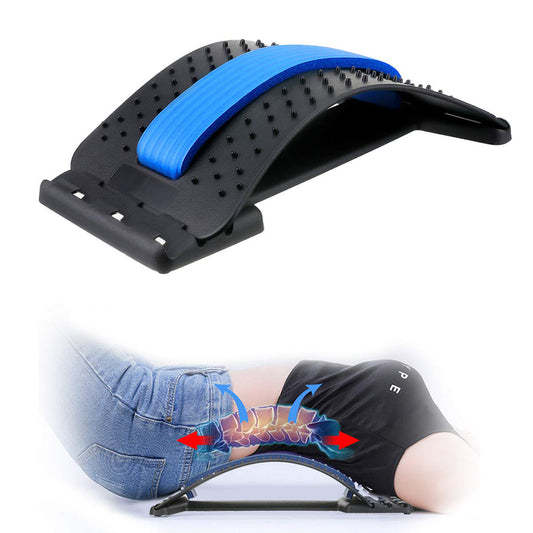
For some people, a posture support or back support product can be a useful part of a broader routine, especially during desk work, commuting, or other periods when slouching tends to happen. The best use is usually as a cue for awareness while you continue improving your setup and taking breaks.
If you want to explore supportive options, you can browse the site’s back support collection for products designed around posture and everyday support needs.
A simple daily routine for people who sit at a computer a lot
If you want an easy starting point, follow this checklist:
- Adjust your chair and screen before you begin work.
- Keep your back supported and your feet grounded.
- Relax your shoulders and avoid reaching for the mouse.
- Take a short movement break at least every hour.
- Rest your eyes by looking away from the screen regularly.
These habits are simple, but doing them consistently matters more than making your setup perfect.

Posture Corrector Back Brace for Men and Women
A simple support option for people who want a reminder to sit and stand with better alignment.
Useful if long desk sessions tend to lead to slouching and rounded shoulders.
Remember that persistent pain, numbness, worsening headaches, or symptoms that interfere with daily life deserve medical attention. This article is for general educational purposes and is not a substitute for professional care.
FAQ
What is the best sitting position for long computer use?
A comfortable neutral position is usually best: back supported, shoulders relaxed, elbows close to your sides, wrists relatively straight, and feet flat on the floor. Avoid leaning your head toward the screen for long periods.
How often should I take breaks from the computer?
A short break every 30 to 60 minutes is a practical target. Even standing up, stretching, or walking for a minute or two can help reduce stiffness from prolonged sitting.
Can poor computer posture cause back and neck pain?
It can contribute to it. Slouching, forward-head posture, and staying in one position too long can increase strain on the back, neck, and shoulders.
Can a back support or posture corrector help?
It may help some people as part of a broader routine, especially as a reminder to avoid slouching. It works best alongside workstation changes, regular breaks, and general posture awareness rather than as a complete solution on its own.